
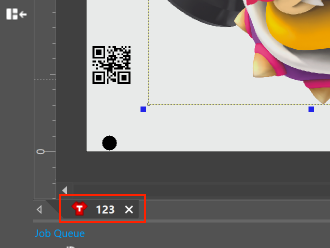
The Arc127 cutting workflow enables the cutting plotter to interpret a QR code instead of conventional OPOS marks, which streamlines alignment and accelerates production. This technique is applicable when the print job name consists solely of numeric characters.
How it works
The QR code is generated automatically and included in:
The printed job
The exported PLT file
This occurs when:
The job name contains only numbers (for example: 123456)
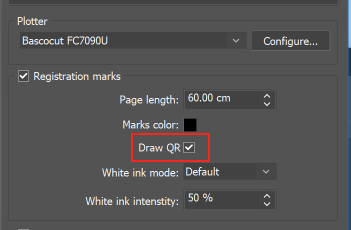
The option “Draw QR” is activated in the cutting settings
The QR code encompasses:
Job dimensions (width and height)
Alignment details
Other production information necessary for the plotter
When the printed material is positioned on the cutting plotter:
Choose the exported PLT file from the plotter console.
Initiate the cutting process.
The plotter will:
Bypass OPOS marks detection
Directly scan the QR code
Automatically gather the job dimensions and alignment information
This minimizes scanning time and enhances workflow efficiency.
Production workflow
Establish the print job.
Rename the job using only numeric characters.
Activate Draw QR in cutting options.
Print the job.
Export the PLT file.
Load the print onto the cutting plotter.
Select the PLT file and commence cutting.
The plotter scans the QR code exclusively and continues automatically.