
Problem
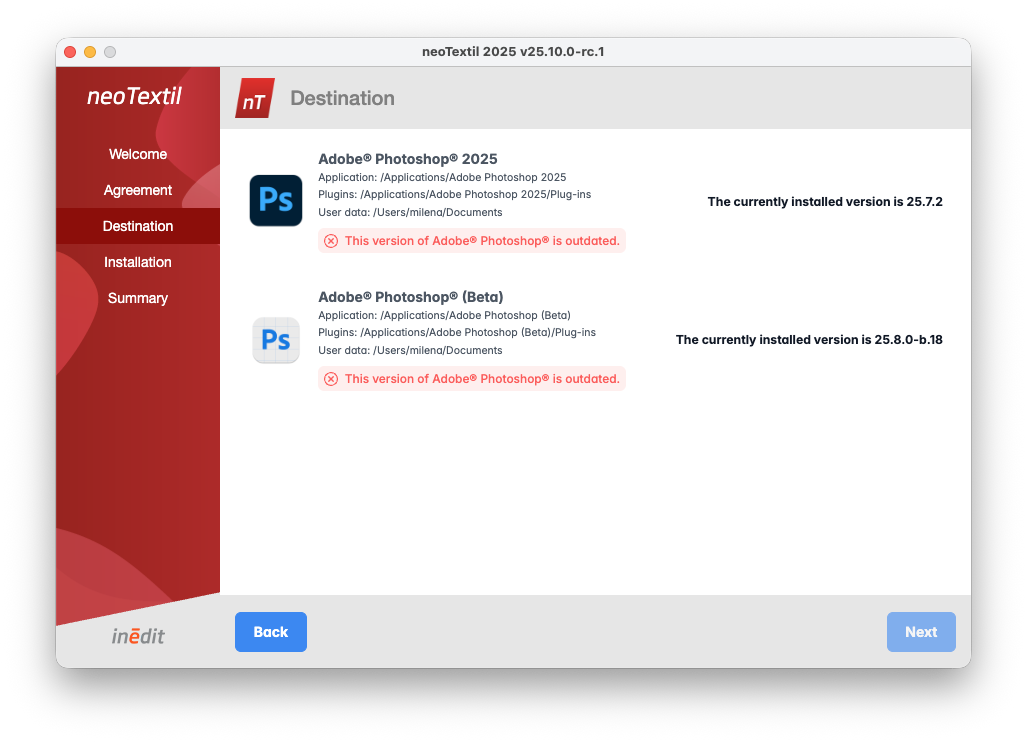
Some users may encounter an issue where neoTextil cannot be installed on Adobe Photoshop, even though Photoshop appears to be installed. This usually happens when Adobe Creative Cloud has not refreshed the installed version information, causing Photoshop to be detected as outdated. In the installer, Photoshop shows the warning: “This version of Adobe® Photoshop® is outdated.”
Solutions
1. Restart Adobe Creative Cloud
This is the most common solution.
Quit Creative Cloud Desktop completely
Click the Creative Cloud icon
Go to Help → Quit
Reopen Creative Cloud
Wait a few seconds for installed apps to refresh
Launch the neoTextil installer again
2. Restart the Computer
Sometimes Creative Cloud services do not fully close. A full system reboot forces version metadata to refresh.
Restart computer
Open Creative Cloud
Verify Photoshop shows the correct version
Run the neoTextil installer again
If the Issue Continues
If the installer still reports Photoshop as outdated:
Take a screenshot of the installer page showing detected versions
Go to Help → System Info... and provide the Photoshop information
- Contact support@inedit.com with this information so we can analyze version-mapping on your system