
Issue
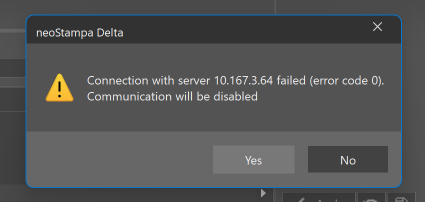
When opening neoStampa, the following warning message appears:
Connection with server 10.167.3.64 failed (error code 0).
Communication will be disabled.
Cause
This message indicates that Cost Calculation cannot communicate with the Consumption server. This can happen when:
The Cost Compute service is disabled.
The connection times out.
There is a version incompatibility between neoStampa.
The Consumption server is not running or is unreachable over the network.
Solution
1. Verify that Cost Compute is enabled in neoStampa
- Open: Edit → Preferences → Logging
- Confirm that the Cost Compute option is enabled and correctly configured.
2. Verify the Cost Compute service in Print Server
- Open: Configuration → Log...
- Check that the Cost Compute service is enabled and running without errors.
3. Verify network connectivity
If the server is hosted on another computer:
Confirm that the server IP address is correct.
Verify that the server is powered on and accessible from the client computer.
Check that no firewall or network policy is blocking the communication.
4. Verify software compatibility
If the problem started after an upgrade, make sure that neoStampa and the Print Server/Cost Compute components are running compatible versions.
If the Issue Persists
If the warning continues after completing the checks above, please provide the following information to Technical Support:
Screenshot of the warning message.
neoStampa version.
Print Server version.
Whether the Cost Compute server is installed locally or on another computer.
Print Server log files, if available.
This information will help determine whether the issue is caused by a configuration problem, a communication failure, or a software compatibility issue.